
StreamQL
StreamQL is the query language used in Caido that gives you the ability to filter WebSocket messages. The constructing primitives of a StreamQL query statement, in order of position, are the:
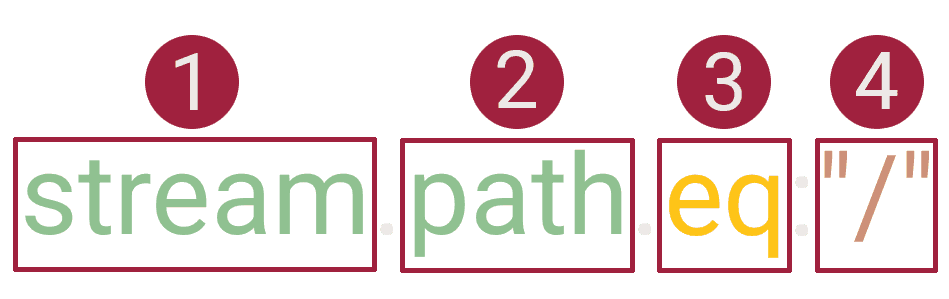
Namespaces
INFO
Namespaces are project-specific.
| Namespace | Description |
|---|---|
ws | All WebSocket traffic. |
stream | All stream messages. |
preset | Filter presets. |
NOTE
The preset namespace does not have any fields available and instead takes a direct value of a filter preset's name/alias.
Fields
ws
| Available Fields | Description | Value Type |
|---|---|---|
created_at | The date and time the message was sent. | Date/Time: RFC3339 (2024-06-24T17:03:48+00:00) / ISO 8601 (2024-06-24T17:03:48+0000) / RFC2822 (Mon, 24 Jun 2024 17:03:48 +0000) / RFC7231 (Mon, 24 Jun 2024 17:03:48 GMT) / ISO9075 (2024-06-24T17:03:48Z) |
direction | The direction of the message. | String/Byte: To Server/To Client |
format | The message type. | String/Byte: Binary, Text, Close, Ping, Pong |
len | The message size in bytes. | Integer |
raw | The full raw data of the message. | String/Byte |
stream
| Available Fields | Description | Value Type |
|---|---|---|
host | The hostname of the destination server. | String/Byte |
path | The URL path. | String/Byte |
port | The port of the destination server. | Integer |
protocol | The protocol of the destination server. | String/Byte |
source | The Caido feature source of the stream message. | String/Byte |
tls | If the connection used TLS/SSL encryption. | Boolean (true/false) |
Operators
| Operator | Description | Value Type | Additional Details |
|---|---|---|---|
eq | Equal to the supplied value. | String/Byte, Integer | Case sensitive. |
gt | Greater than the supplied value. | Date/Time, Integer | |
gte | Greater than or equal to the supplied value. | Integer | |
lt | Less than the supplied value. | Date/Time, Integer | |
lte | Less than or equal to the supplied value. | Integer | |
ne | Not equal to the supplied value. | String/Byte, Integer | Case sensitive. |
cont | Contains the supplied value. | String/Byte | Case insensitive. |
like | The SQLite LIKE Operator. | String/Byte | Case sensitive for Unicode characters beyond the ASCII range. |
ncont | Does not contain the supplied value. | String/Byte | Case insensitive. |
nlike | The SQLite NOT LIKE Operator. | String/Byte | Case sensitive for Unicode characters beyond the ASCII range. |
regex | Matches to the regular expression. | String/Byte | Rust-flavored syntax. |
nregex | Does not match to the regular expression. | String/Byte | Rust-flavored syntax. |
TIP
In SQLite - the % character matches zero or more characters (%.js matches .map.js) and the _ character matches one character (v_lue matches vAlue). Visit https://regex101.com/ and select Rust syntax to test regular expressions.
NOTE
Not all regex features are currently supported by Caido (such as look-ahead expressions) as they are not included in the regex library of Rust.
Values
preset
| Available Values | Example |
|---|---|
| A filter preset's alias. | preset:"no-health-check" |
| A filter preset's name. | preset:"No Health Check" |
source
| Available Values | Additional Details | Example |
|---|---|---|
automate, intercept, plugin, replay, workflow | Requires lowercase. Autocomplete is not supported. | stream.source.eq:"intercept" |
Combining Statements
Query statements can be combined together using logical operators and logical grouping.
Logical Operators
| Operator | Description |
|---|---|
| AND | Both the left and right clauses must be true. |
| OR | Either the left or right clause must be true. |
INFO
Operators are case insensitive. Both have the same priority.
Logical Grouping
Caido supports the priority of operations: AND has a higher priority than OR.
<Clause1> AND <Clause2> OR <Clause3>is equivalent to((<Clause1> AND <Clause2>) OR <Clause3>).<Clause1> OR <Clause2> AND <Clause3>is equivalent to(<Clause1> OR (<Clause2> AND <Clause3>)).<Clause1> AND <Clause2> AND <Clause3>is equivalent to((<Clause1> AND <Clause2>) AND <Clause3>).
TIP
While parentheses are optional, we recommend using them to make your logical grouping clear.
Comments
Caido supports both single-line and multi-line comments in StreamQL queries.
TIP
Comments can be used to write descriptions or temporarily disable certain query statements.